

Filing GST returns is one of the most important jobs for any business and for the accountant who looks after its books. But if you open the GST portal for the first time, it can feel like a lot. There are many tabs, many tables and a lot of deadlines.
Every registered company in India is required to inform the government about their sales, purchases, and taxes paid. The two returns that play an important role in the reporting procedure include GSTR-1 and GSTR-3B. But if you are new to accounting, the whole procedure of filing GSTR-1 and GSTR-3B forms online can be quite confusing at first.
GSTR-1 lists the sales you made. It is a statement of your outward supplies.
The GSTR-3B is a monthly return. It includes declaration of total sales, claiming of ITC and payment of tax.
This guide will help you understand the relationship between the two returns and also take you through the process of filing both returns on the GST portal.
GST Return: What Is It and Who Has to File It?
A GST Return is a form that a registered taxpayer submits to the government, which states his/her sales, purchases, tax charged, and tax paid for a particular period.
If your business is registered under GST, you have to file returns even when there were no transactions in the month. A month with no activity still needs a nil return.
Here are the main returns at a glance.
Return | What It Covers | Frequency |
GSTR-1 | Outward supplies (sales) and tax liability details. | Monthly or Quarterly |
IMS & GSTR-2B | Auto-drafted Input Tax Credit (ITC) statement reflecting your suppliers' filings and your actions in the Invoice Management System (IMS). | Monthly |
GSTR-3B | Summary return for declaring liabilities, claiming eligible ITC, and making final tax payments. | Monthly or Quarterly |
GSTR-9 | Consolidated annual return summarizing all monthly/quarterly returns filed during the financial year. | Yearly |
GSTR-9C | Self-certified reconciliation statement matching the figures in the Annual Return (GSTR-9) with the audited annual financial statements. | Yearly (Mandatory for taxpayers above ₹5 Crore turnover) |
For beginners who wish to learn about GST compliance, the concepts of GSTR-1 & GSTR-3B are good starting points.
GSTR-1 vs GSTR-3B: What’s the Difference?
In order to file GST efficiently, it is necessary to know how GSTR-1 and GSTR-3B differ and relate to each other.
What Is GSTR-1?
GSTR-1 is your sales statement. GSTR-1 is the return used by regular taxpayers to report details of their outward supplies of goods and services. That is it contains line-by-line invoice details of all goods and services sold during a given tax period. That includes:
Sales Invoices of B2B sales with the GSTIN of the buyer.
Sales Invoices of B2C sales (classified into large inter-state sales and small intra-state sales).
Credit notes and debit notes.
Export sales and zero-rated supplies.
HSN/SAC summary codes for goods and services sold.
Purpose: GSTR-1 informs tax authorities about how much tax you collected on sales. More importantly, when you file GSTR-1, the invoice data flows into your buyers' GSTR-2B, allowing them to legally claim Input Tax Credit (ITC) on what they bought from you.
What is GSTR-3B?
GSTR-3B is a self-declared summary return. Unlike GSTR-1, it does not ask for individual invoice numbers. It is a summary return in which eligible taxpayers declare their GST liabilities and eligible input tax credit and discharge the resulting tax liability.
The return generally covers:
Total taxable outward supplies (sales) and tax collected.
Total eligible Input Tax Credit (ITC) on business purchases.
Exempt, nil-rated, or other supplies.
Reverse-charge transactions and other relevant liabilities.
Tax payment and adjustment using the permitted ledger balances.
Purpose: GSTR-3B is used to calculate your final tax liability and pay any balance owed to the government using cash or credit ledgers.
Always match these figures with your sales records, your purchase records and the data on the GST portal before you file.
Difference Between GSTR-1 and GSTR-3B
Point of comparison | GSTR-1 | GSTR-3B |
Main purpose | Reports outward supply details | Summarises tax liability and eligible ITC |
Information reported | Invoice-level and other prescribed supply details | Summary-level tax and credit figures |
Input tax credit | Not its primary purpose | Reports eligible and other prescribed ITC details |
Tax payment | Does not itself discharge the period's tax liability | Used to discharge the declared tax liability |
Why it matters | Helps report sales accurately and supports buyers' compliance | Helps calculate and pay the tax due |
Memory Tip: GSTR-1 tells the government what you sold, while GSTR-3B pays what you owe.
The two returns are connected. Information reported in GSTR-1 can be used to auto-populate relevant fields in GSTR-3B, while purchase-related information available through GSTR-2B can help taxpayers review ITC. Auto-populated values should still be checked before filing.
If you read our post on GST vs Income Tax, you will remember the shirt example. The shopkeeper sold a shirt for ₹2,000 with ₹100 GST. GSTR-1 reports that sale. GSTR-3B takes off the ₹75 of input tax credit and pays the remaining ₹25.
Due Dates & Filing Frequency
Filing returns on time keeps your business compliant and avoids daily penalties.
Return Type | Monthly Filers (Regular) | QRMP Scheme (Quarterly Filers) | Late Fee / Penalty |
GSTR-1 | 11th of the following month | 13th of the month following the quarter | ₹50/day (₹20/day for Nil return) up to set caps |
GSTR-3B | 20th of the following month | 22nd or 24th of the month following the quarter | ₹50/day (₹20/day for Nil return) + 18% p.a. interest |
Three things to keep in mind:
The government sometimes extends due dates. Always check the GST portal before you file.
File GSTR-1 first. The sales figures in GSTR-3B now come from GSTR-1, so the order matters.
QRMP is a scheme for small taxpayers. They file their returns every quarter but still pay tax every month.
Before You Start: A GST Return Filing Checklist
In order to not get caught up in the middle of the process, gather all necessary documents before starting:
GST portal login: Your registered login credentials and access to the required authentication method.
Sales Register: All sales invoices, debit notes, credit notes, and export records during the period.
HSN/SAC Summary: Total quantities and values categorized by HSN/SAC codes.
Purchase Register & GSTR-2B: Your complete purchase list, reconciled against the portal's GSTR-2B statement to verify eligible Input Tax Credit.
Accounting records: Your sales ledger, purchase ledger and relevant reports from software such as TallyPrime or Zoho Books.
Ledger Balances & Bank Account: Sufficient funds in the Electronic Cash Ledger, Electronic Credit Ledger, or linked bank account to settle net tax liabilities. If sufficient balances are not available in the Credit Ledger and Cash Ledger, then only the amount is paid from the linked bank account.
Verification Tool: A Digital Signature Certificate (DSC) for companies and LLPs, or an Electronic Verification Code (EVC via mobile OTP) for proprietorships and partnerships.
How to File GSTR-1 Online: Step-by-Step Guide
Step 1: Login to the GST Portal with your credentials.
Step 2: Go to Return Dashboard Select Financial Year, Quarter or Month & Return Filing Period (Month/Quarter).
Step 3: Select GSTR-1 Choose Prepare Online (or Offline Utility for large data).
Step 4: Fill In Invoice Details Across Relevant Tables:
Table 4A, 4B, 4C, 6B, 6C: B2B Invoices (mandatory GSTIN entry).
Table 5: B2C Large Invoices (inter-state >₹1 Lakhs invoice value).
Table 6A: Export Invoices
Table 7: B2C Small Invoices (intra-state and remaining sales).
Table 8A,8B, 8C, 8D: Nill Rated(Exempted, Non GST, Nill Rated Supplies)
Table 9B: Credit / Debit Notes (Registered & Unregistered).
Table 11A(1), 11A(2): Advances Received
Table 11B(1), 11B(2): Adjustment of Advances
Table 12: HSN-wise summary of outward supplies.
Table 13: Documents issued
Table 14: Supplies made through e-commerce operator
Table 15: Supplies U/s 9(5)
Step 5: Generate summary report for GSTR-1 and verify the numbers against your sales register in Tally/Zoho Books.
Step 6: Submit and file using EVC or DSC (via OTP/Digital Signature Certificate).
An option for GSTR-1A is available on the GST Portal that enables taxpayers to make changes to the invoices that may be missing in the GSTR-1 filing before the filing of GSTR-3B. Make sure you check all the options on the dashboard before making any filing.
How to File GSTR-3B, Step by Step
Step 1: Login to the GST Portal, and access Services> Returns> Returns Dashboard.
Step 2: Choose the Financial Year, Quarter (if any), and Month for filing return.
Step 3: File GSTR-1 first.
Step 4: Go to the Invoice Management System (IMS) dashboard
Review the visible purchase invoices and mark them as Accept, Reject, or Pending based on your internal purchase register.
Step 5: Wait for GSTR-2B Auto-Drafting & Reconcile ITC
Step 6: Click on GSTR-3B and click on Prepare Online. Choose the Financial Year, Quarter (if any), and Month for filing return.
Step 7: Answer the opening question regarding filing a Nil Return (Yes or No)
Submit a Nil Return: If there have been no sales, no receipt of goods or services, and no tax liability in the tax year.
Step 8: Verify and Manually Add Details (Including RCM(Reverse Charge Mechanism))
Check the auto-populated tiles and manually type in corrections or missing values:
Table 3.1 (Outward Supplies & RCM Liability)
Verify Sales: Check that the sales figures match your filed GSTR-1.
Type RCM Liability manually: Go to Table 3.1(d) (Inward supplies liable to reverse charge) and manually enter the Integrated Tax (IGST), Central Tax (CGST), State Tax (SGST), and Cess that you owe on reverse charge purchases.
Table 4 (Eligible ITC & RCM Credit):
Verify regular ITC: Review the regular credit auto-populated from GSTR-2B.
Verify RCM ITC: Go to Table 4(A)(3) (Inward supplies liable to reverse charge). Ensure the RCM ITC is added here so you can claim the tax credit back.
Adjust for Ineligible ITC: Manually input any ITC reversals or ineligible credits in Table 4(B).
Confirm Changes and Save GSTR-3B.
Step 9: Calculate Tax Liability & Pay Balance:
Offset tax liability using available ITC ledger balances (CGST, SGST, IGST rules).
Pay the remaining tax shortfall by generating a Challan via Net Banking/UPI/NEFT.
Step 10: Proceed to File & Submit using EVC (OTP) or DSC.
If you had no sales and no purchases during a month, filing a Nil return is quick and simple. You can file a Nil GSTR-3B directly on the portal by checking the Nil Return box on the dashboard.
Looking for Practical Accounting Training?
Want hands-on experience filing live GST returns, performing GSTR-3B reconciliations, and managing client accounts on TallyPrime and Zoho Books? Explore Special40's Practical Accounting & Taxation Program in Kochi and get CA-certified, job-ready training today!
A Simple Example: How GSTR-1 and GSTR-3B Work Together
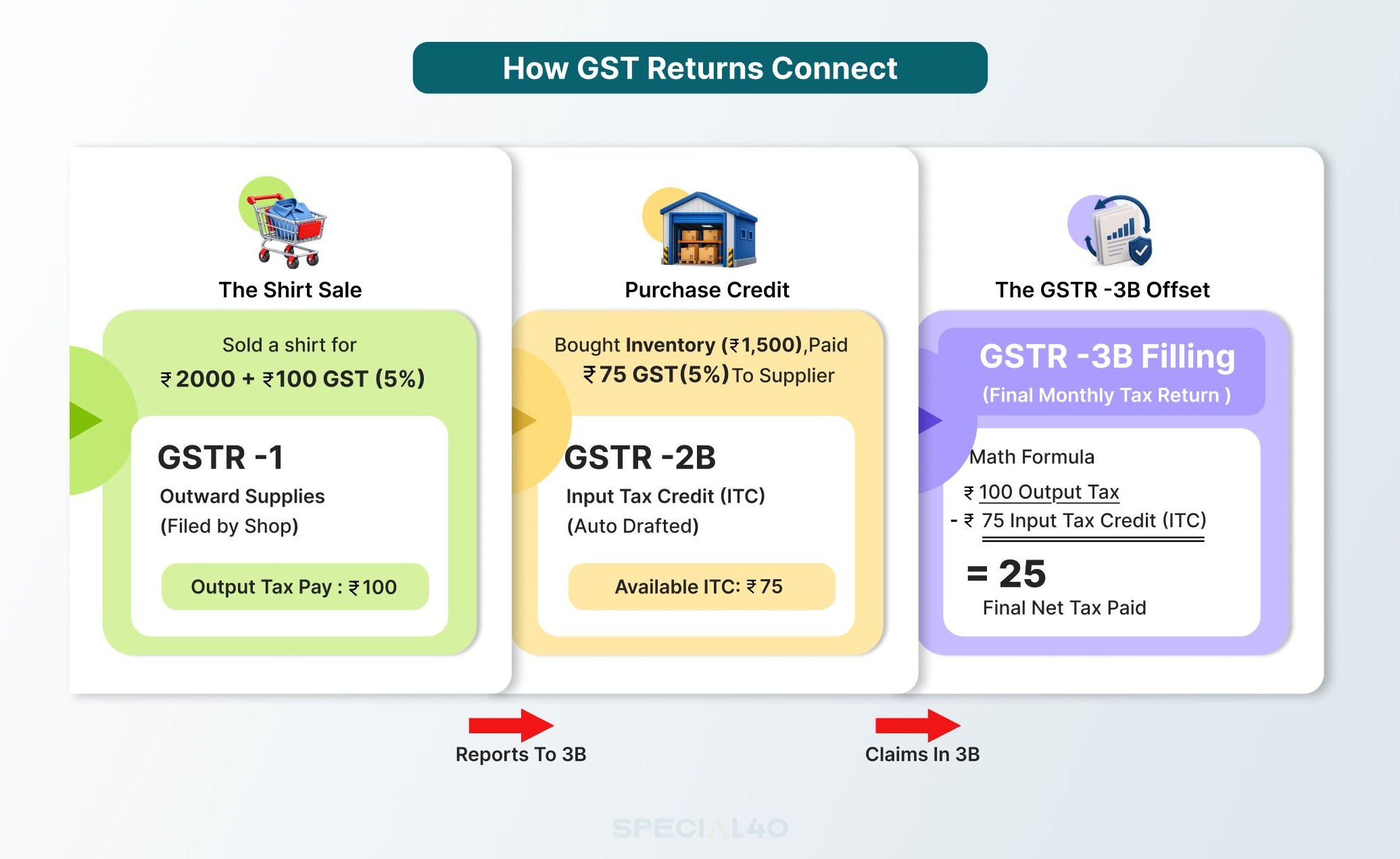
To see how GSTR-1 and GSTR-3B work in practice, let's look at a simple business example:
Let's use the same shirt shop from our earlier post, so you can see the full flow.
Sale: ₹2,000 plus 5% GST gives ₹100 of output tax.
Purchase: ₹1,500 plus ₹75 GST gives ₹75 of input tax credit.
In GSTR-1, the shopkeeper reports the ₹2,000 sale and the ₹100 tax.
In GSTR-3B, the output tax is ₹100. Take away the ₹75 input tax credit, and the net tax to pay is ₹25.
For a sale within the same state, GST is split into CGST and SGST. So the ₹25 shows up as ₹12.50 of CGST and ₹12.50 of SGST.
Watch our step-by-step video below to see exactly how this ₹100 moves through the entire GST and Income Tax journey.
What happens if you forget a purchase invoice?
If you miss recording the purchase invoice or if your supplier forgets to upload the purchase invoice in GSTR-1, your credit of ₹75 will not appear in your GSTR-2B. This means that the ITC becomes ₹0 and you end up paying the entire ₹100 output tax yourself.
That is why proper maintenance of your purchases can help you save money.
Late Fees, Interest and What Happens If You Miss a Date
Missing return deadlines leads to portal penalties that accumulate automatically:
Late Fees: If you file GSTR-3B after the due date, a late fee of ₹50 per day (₹25 CGST + ₹25 SGST) applies for each day of delay. For Nil returns, the fee is ₹20 per day. Late fees are capped based on your business turnover, but they add up quickly.
18% Annual Interest: If you owe tax and pay late, interest is charged at 18% per annum on the unpaid net tax balance. The portal calculates this interest automatically when you file your next return.
Blocking of GSTR-1: If you fail to file GSTR-3B for a month, the system automatically blocks you from filing GSTR-1 for subsequent months, disrupting your buyers' credit claims.
Common Mistakes to Avoid When Filing GST Returns
Filing GSTR-3B Without Reconciling GSTR-2B: Claiming excess or unreflected ITC can trigger tax notices.
Mismatch Between GSTR-1 and GSTR-3B: Declaring different sales figures in GSTR-1 and GSTR-3B causes tax discrepancy alerts.
Ignoring HSN Code Summary: Incorrect or missing HSN summary details in GSTR-1 leads to portal errors.
Delaying Return Filing: Missing deadlines attracts daily late fees and 18% annual interest on tax due.
Nil Returns Are Mandatory: Even if your business had zero sales or purchases in a given month, you must file a Nil GSTR-1 and Nil GSTR-3B to avoid late fees.
No Revisions After Filing: Once a GST return is submitted and filed, it cannot be revised; any errors must be rectified in subsequent return cycles
Modern accounting software like TallyPrime and Zoho Books can compile data and generate ready-to-upload JSON files. However, software cannot verify whether a vendor invoice is valid, whether an input credit is legally allowed, or whether sales figures match bank deposits.
Understanding compliance rules, checking data accuracy, and verifying numbers before pressing Submit remains a human responsibility. Mastering these practical skills is what makes accounting professionals valuable to employers.
Related Posts: B.Com Graduate With No Job? Skills Employers Actually Want
Conclusion
Mastering GSTR-1 and GSTR-3B comes down to understanding their distinct roles: GSTR-1 reports outward sales details, while GSTR-3B summarizes overall liabilities, applies tax credits, and processes payments.
By keeping clean sales and purchase ledgers, reconciling purchases monthly against GSTR-2B, and filing on time, you can protect your business from unnecessary penalties and maintain smooth operations.
Filing GSTR-1 and GSTR-3B accurately is essential for keeping businesses compliant, maintaining smooth cash flow, and avoiding penalties. Master the rules of invoice entry, GSTR-2B reconciliation, and timely tax payment to become a confident accounting professional.
FAQ
What is the difference between GSTR-1 and GSTR-3B?
GSTR-1 is the form detailing individual outward sales invoices. GSTR-3B is a consolidated summary return used to calculate final tax liabilities, claim input tax credits, and pay net tax owed to the government.
Which should I file first, GSTR-1 or GSTR-3B?
You must file GSTR-1 first. The sales figures stated in GSTR-1 auto-populate into your GSTR-3B return.
Can I revise GSTR-1 or GSTR-3B after filing?
No, GST returns cannot be revised once filed. If you make a mistake, you must make adjustments or corrections in the return for a subsequent tax period. For some GSTR-1 details, the portal also offers GSTR-1A before you file GSTR-3B.
What are the due dates for GSTR-1 and GSTR-3B?
The due dates for regular monthly filers, GSTR-1 is on the 11th of the following month, and GSTR-3B is on the 20th of the following month.
Do I need to file GSTR-1 and GSTR-3B if I have no sales?
Yes. Filing a Nil return is mandatory even if you had zero sales and purchases during the tax period.
What happens if I file GSTR-3B late?
Filing late causes a daily late fee (up to maximum statutory limits) and 18% annual interest on any unpaid tax balance.
Can I correct a mistake after filing?
Yes, but not by revising the same return. You correct it in a later return. For some GSTR-1 details, the portal also offers GSTR-1A before you file GSTR-3B.
What is the QRMP scheme?
The Quarterly Return Monthly Payment (QRMP) scheme allows small businesses (turnover up to ₹5 Crore) to file GSTR-1 and GSTR-3B quarterly while paying estimated taxes monthly using a payment challan.
What happens if GSTR-1 sales do not match GSTR-3B tax paid?
A mismatch between sales reported in GSTR-1 and taxes paid in GSTR-3B can cause automated system notices under Section 75(12) of the CGST Act, requiring you to clarify the difference or pay the tax shortfall immediately.